Simply Incredible
If I can’t figure out why my variation didn’t work, I take a picture and get the answer within seconds.
Lucidchess
Take a photo, share a screenshot, or scan a diagram on the web. Open the position on an interactive board, explore the moves, and bookmark it to keep it in your Library.
For iPhone and Android
Or add the Scanner to your browser
On Edge, install the extension from the Chrome Web Store.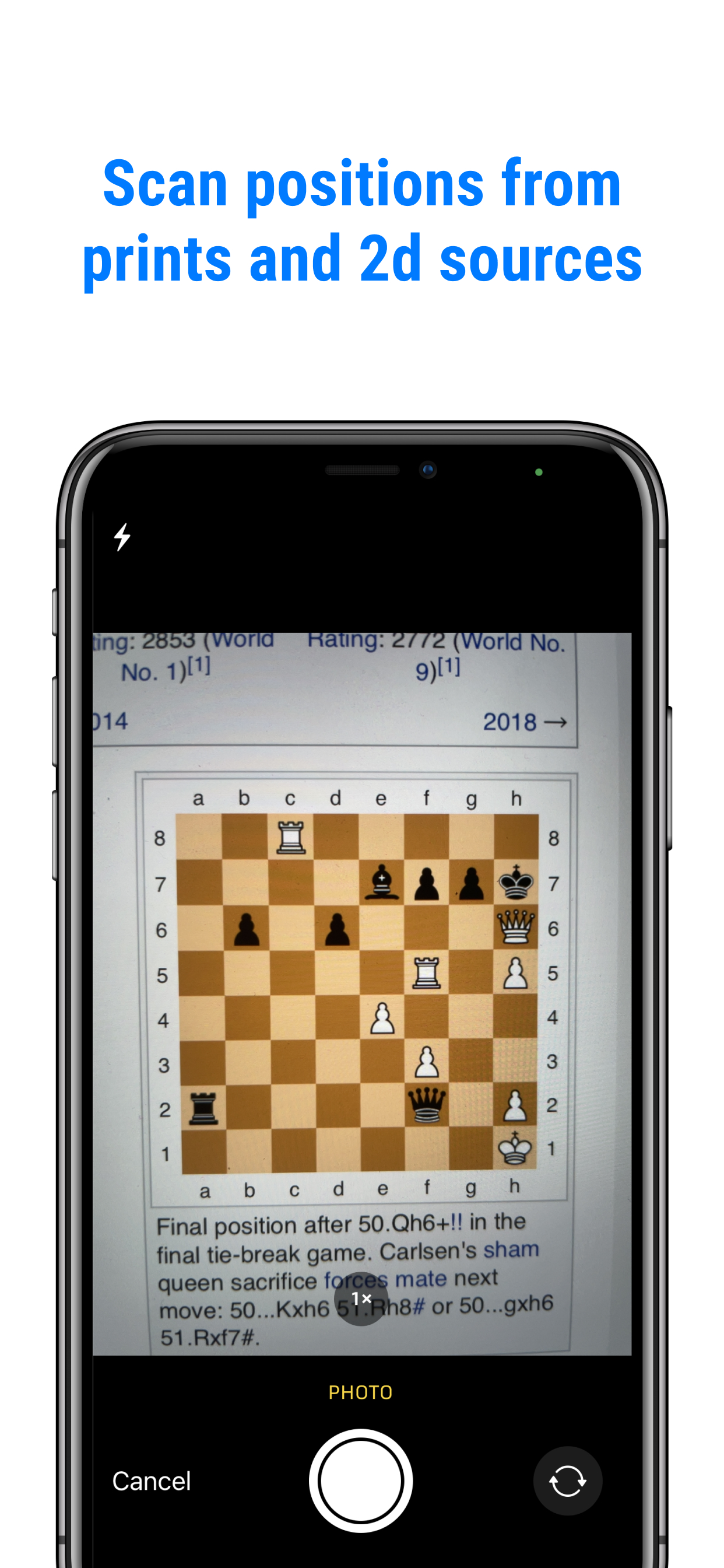
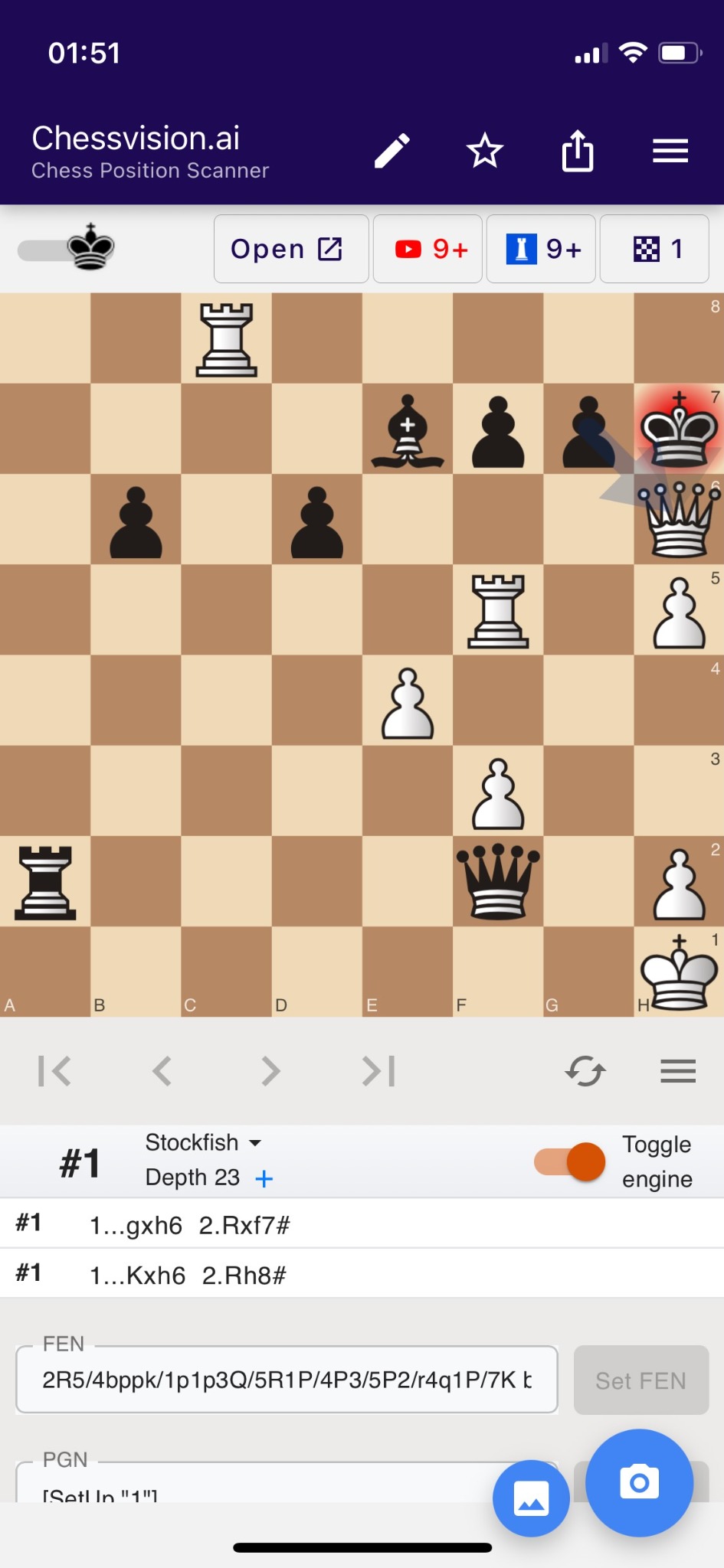
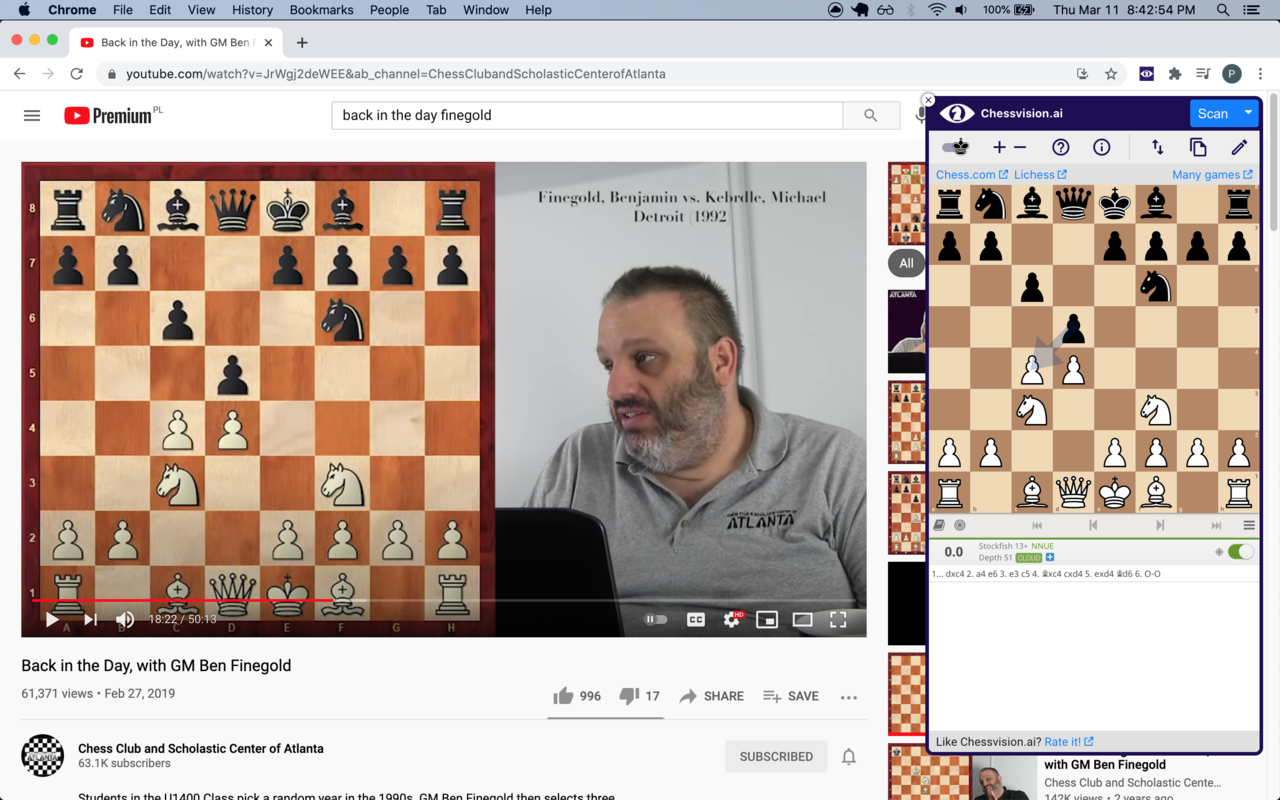
From a book, photo, webpage, or video. Scan the position, analyze it, and save the ideas you want to return to.
Real experiences with our apps.
If I can’t figure out why my variation didn’t work, I take a picture and get the answer within seconds.
This extension has completely changed how I review my PDFs and small Kindle collection of chess books.
the board which auto loads the position of any board in the book I want and then I can play along with the book.
Super fast and incredibly helpful, allows me to experiment and try puzzles from youtube videos quickly and easily
Absolute best chess plugin, this saves so much work compared with manual position setup.
Brilliant way to follow along during an educational chess video. Just snap the board and analyse. One of the few genuinely useful chess apps.
I used to put chess puzzles from youtube into my study engine at restframe.us/chess/ by hand when I wanted to test if my thinking is correct before watching the video. This is so much easier. This is a very useful tool
Each position took me about 1 min to enter, and sometimes with mistakes. Wish I found this app years earlier
Saves so much time not having to recreate by hand. 4 clicks instead of 100.
Really easy to open and analyse positions, for example taking a picture of a position in a book to open it and explore it.
I rarely write reviews but this has been really helpful for me. Any chess project that needs disecting and scanning diagrams, this is the best. Better than normal LLMs at scanning.
Genius. I mainly use for going through the moves from a chess book, or comparing other games from opening prep
It even lets me practice on the positions without ever setting up the board personally. Well worth it.
Ideal to scan a position from a tactics book to solve it as a defensive or offensive puzzle ie switch sides and stop the tactic
Absolutely amazing, I'm using it everytime my mere mortal brain can't comprehend top players' positions on Twitch. Thank you so much!
Amazingly convenient to analyse diagrams using engine, whether screenshots from the internet or using phone camera for books.
I scan the training positions via chessvision extension to analyze it with an engine. It works perfect and the scan is very fast.
Love it for checking puzzles and evals on Twitter. Hasn't crashed once and super easy GUI. 👏
It was very tedious before to put some positions manually into Lichess to analyze/play with the engine. Not anymore!
Now it’s as simple as taking a photo. Playing against the computer in the app makes it even easier.
Was very helpful for me when watching 100 endgames you must know from Chessable
I desperately needed to scan an image of a chessboard without manually typing the FEN, and this has helped a lot.
one click and it got it perfectly and I was able to load it into the analysis board on chess.com.
I use this app to view puzzles from Twitter. I will also use it to work through Kindle chess books. Very nice app!!!
This is a greate tool. Helps me every day! It works even with bad black and white chessboard images.
This is by far the best app as a companion for reading chess books. It has made studying enjoyable finally.
And then I think I find a great move or am refuting something, I can immediately put it on a board with Stockfish loaded.
The founder corresponded with me over several days and fixed the underlying bug in under a week. Great experience for this user!
A great resource for people who want to analyze positions they find without having to manually modify an analysis board for minutes.
the developer responded to my e-mail within an hour telling me exactly how to fix the problem
You can use this to take puzzles from Youtube or analyze chess.com games in Lichess if you're not a premium user.
I would need to set up the position piece by piece while this app allows u to do this instantly.
Very useful, if you watch chess videos, and want sometimes to analyze a particular position.
you want to play around with an analysis board rather than just being told the solution then this app is for you.
Adding analysis and position search to YouTube videos, connecting chess book diagrams to engines, upgrading Lichess and Chess.com interfaces—really a great app.
I take screenshots from my chess ebooks and scan with the app. Awesome! I rate it 10/10.
I love direct link to analyse position via lichess (and chess.com). It saved me already hours retyping board into analysis board
The app will convert a photo to a playable chess board which is great for puzzles, analyzing positions, etc.
I use it to review book positions on the spot, and it really speeds up my studying.
you don't have to frame the chessboard in a box, and you don't have to tell it the board orientation beforehand.
Ever watch a game online and wonder what happens if they go there or who is better in the position? Scan the position using this app and you can play out the moves you would like to see or ask the computer to give you an evaluation.
Screenshot to PGN, directly analyze in the app, choice between on-device or in-cloud analysis, and easy export to other apps (Chess com or Lichess).
Camera takes a photo of virtually all chess diagrams. Instant link to YouTube videos.
Amazing, it recognizes the positions very well, it has an engine included that calculates the best moves, and it can export the FEN. Recommended.
now i jst take a screenshot and scan it in this app and the new update to play with computer is even better.
It even has an option where you can go to chess.com or lichess analysis board directly with the position you have selected...
I like to read chess books and this app easily converts pictures of boards to fens.
Chessvision is - besides standard chess databases - my very best friend during computer based / online chess training sessions.
analyze positions from youtube videos (just pause the video and push the Chessvision scan icon), and it has been completely accurate so far!
one of the best chess extension ive ever used
Fantastic app which is super helpful to figure out difficult positions quickly. Great to check puzzle answers!
Helped me to solve the stupid Rule 16 of The Password Game right off the bat. Thanks!
No other programs accuracy comes close to this one on importing images.
It is a very helpful extension that saved me a lot of time setting up positions to analyze I definitly recommend it👍❤️
I’ve been able to learn and study games of GMs and this helps me a lot with puzzles when I don’t know the answer.
Great for analyzing people's games on chess tv
Great work better than older chess book study which is no longer working on updated android devices. Highly recommended🥰🥰🥰
it helps me analyze all the things i need to know about the position overall: a great extension
You can take pictures from diagrams in a paused video, which just opens a great deal of possibilities.
I'm a chess player and software engineer. You guys have made this extension really helpful to study chess. Thanks a lot.
A great app for capturing diagrams and analyzing. There are several of these now. This is one of the best.
Absolutely what I was looking for Most accurate and enriched with great features like, directly going to analysis board of the great lichess.org
It works really well! Helpful when reading chess books and working from diagrams.
Such a great tool. It helps me a lot for my chess training. Big thank you to chessvision.ai !!!
You take a screenshot, put it in this app and it will give you the best analysis. And it's very fast.
It's the year 2021. No flying cars, but we do have this, so that's something.
Best app..Converting Chess problem image to Chess Analysis which saves huge time chess players. Thank you team
This is the dream learning extension for beginner, intermediate, and advanced users.
So helpful for chess studies... Thanks a lot for this great job !
Trying to build this using computer vision application myself, however this is seamless. This definitely should be a paid product.
This is an excellent app for inputting and analysing all kinds of puzzles and positions. . Highly recommend!
This is my favorite extension of all time not a joke!
My son is quite passionate about Chess—I like it as well—and this app was like magic to both of us.
Such a useful extension. I love it. Use it with YouTube videos all the time.
as the team told me, there no need to crop the image.
understand and use in 1 minute. Thank you!
Exactly what I needed to accompany chess studies from a book.
Flawless app. Fast response from Pawel when I had a question.
this is an excellent resource. so innovative, I can't recommend it enough. Simply fantastic for those who want to study chess positions
Found a position worth coming back to? Bookmark it in the mobile Scanner or browser extension. Your saved position goes to Library, where you can Organize, Study, and Train with Flashcards.
Open Library (opens in a new tab)Scan a diagram on your phone or in your browser, then tap the star/save button to keep it.
Open Library with the same Chessvision.ai account. Your saved positions are waiting in your Inbox.
Open a position as a Study, explore the ideas, and add variations or a goal to practice with Flashcards.
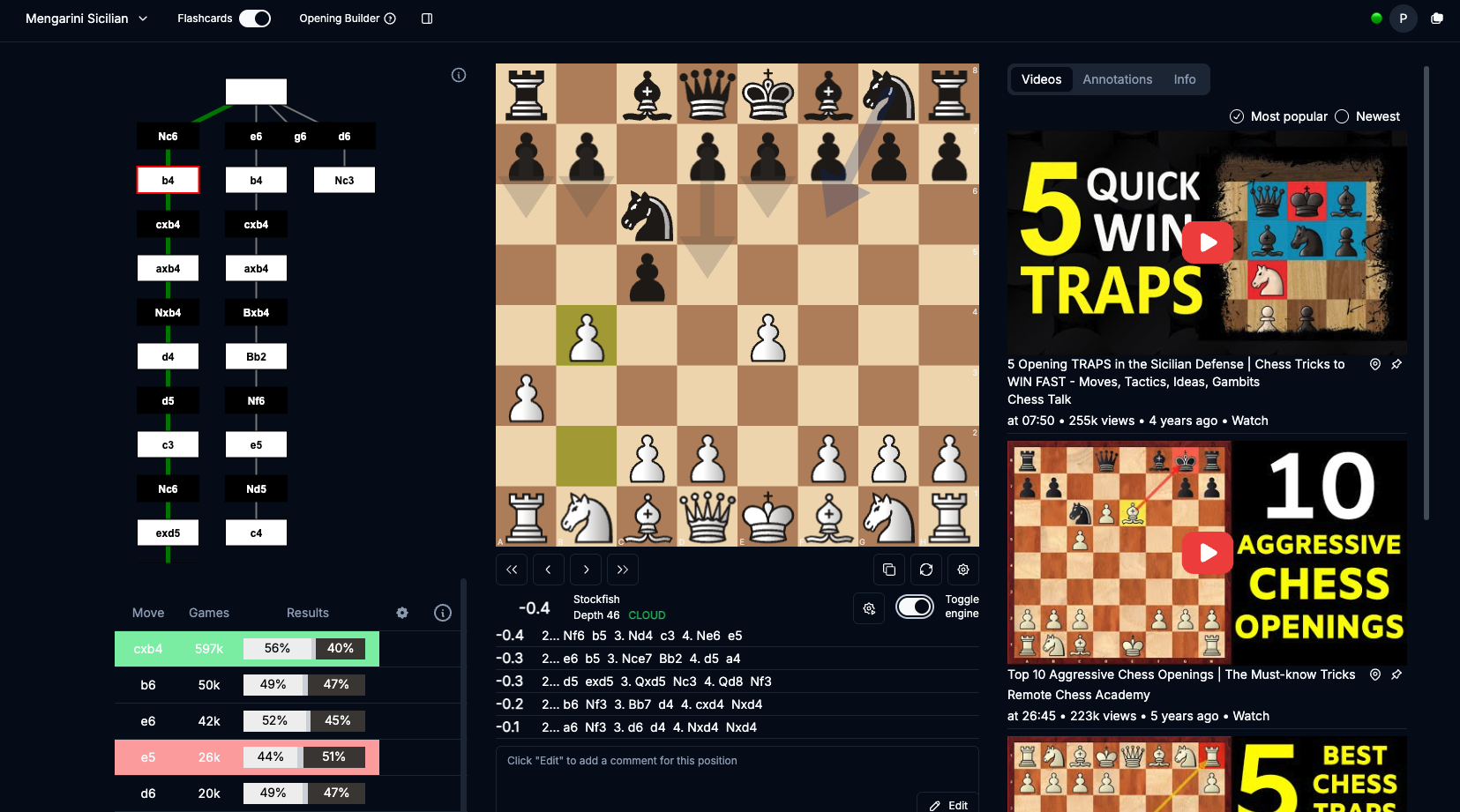
Save diagrams from the Scanner or extension, import FEN and PGN, and organize your Studies into Folders. Explore variations, add comments, and keep useful video explanations beside the board.
Organize your saved positions into Studies and Folders. Bring in more ideas from the eBook Reader or from FEN or PGN files.
Practice your openings, tactics, and endgames with dedicated Flashcards for each position type and Spaced Repetition. We use revolutionary training that helps you learn concepts rather than just remember them.
Find YouTube videos that match a position, pin them to a Study or a specific move, and play them from the moment the position is explained.
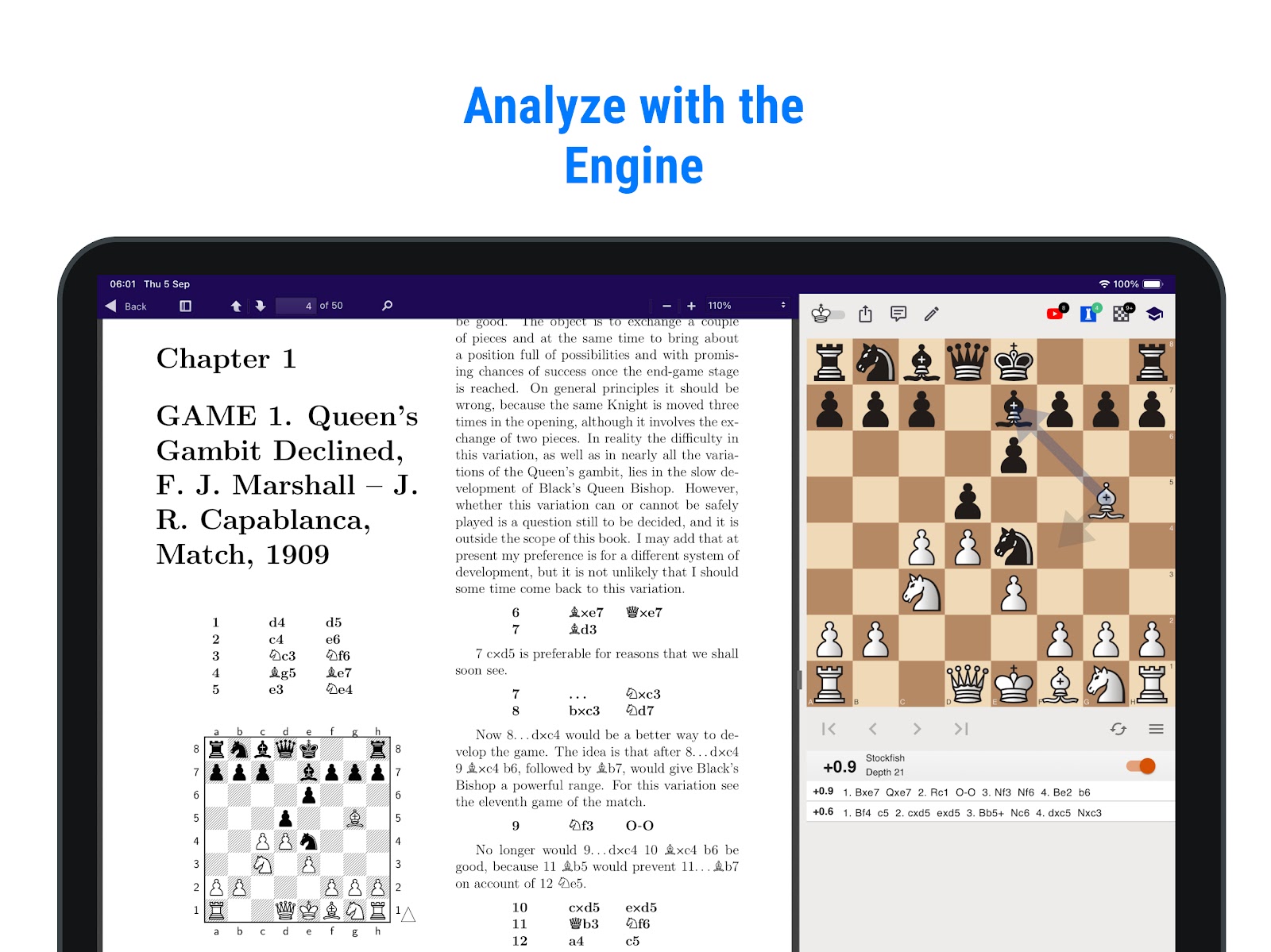
Open a chess book you already own. Double-click a diagram and explore the position on an interactive board, right beside the page.
Your books are synchronized across all your devices, desktop and mobile.
PDF, ePub, and DjVu
Choose the tool that fits how you study and analyze chess. They all complement each other.
Take a photo of a diagram or share a screenshot. Explore the position on an interactive board on your phone or tablet.
Scan a diagram on any webpage or in any video, then explore the position right in your browser.
Save positions, organize your Studies, and train your openings, tactics, and endgames with Flashcards.
Open a chess book and explore its diagrams alongside the page. Play through the author's lines or try your own moves.